
Installation
InterDiode is available as Docker/OCI images from Docker Hub.
To test locally, a demo with docker-compose is available.
Global architecture
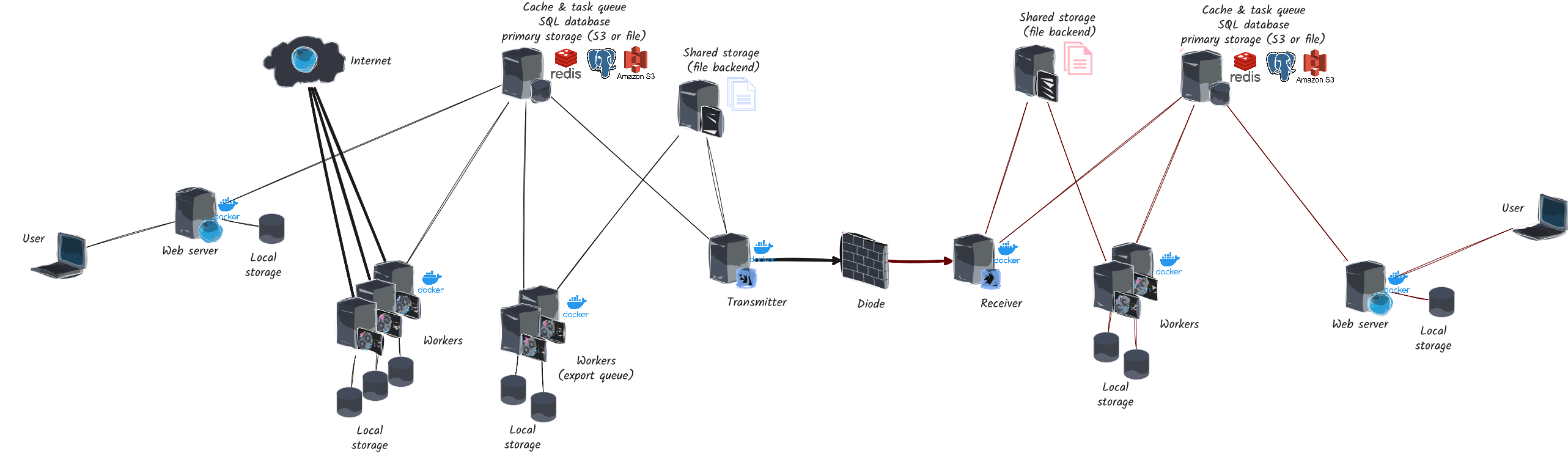
As described in the diagram above, InterDiode relies on various external processes:
PostgreSQL database (primary data),
Redis database (cache and queues),
a filesystem shared by all containers or S3 storage,
a strongly recommended HTTP reverse proxy.
InterDiode itself requires several independent processes, as documented here :
the web service (usually behind the reverse proxy),
workers for different task categories,
the scheduler that will trigger scheduled tasks,
the sending process (black side) and the receiving process (red side) if you use the TCP or UDP transfer protocol.
Server requirements
A minimal production installation requires a server connected to the internet (the black side) and a server on the internal network (the red side). For data transfers, several solutions are available:
direct unidirectional UDP link,
direct TCP link accepting return acknowledgments,
or raw file export/import to use your own solution to transfer data.
If you use a direct UDP connection with a real data diode, you must know the MAC address of the red server to inject it into the ARP cache of the host machine before using the integrated air gap protocol. This must be done on the host machine, not in the Docker container. This is required since the black server will send data to the red server without any acknowledgment, and the ARP cache must be pre-populated to ensure that the data is correctly routed. More details are given on Transfer Options.
Server sizing depends on the amount of data to synchronize, but for testing purposes, a server with 100 GB of disk space, 4 vCPUs, and 8 GB of RAM is more than sufficient. Background workers can require a lot of memory, depending on the number of elements to synchronize: data are kept in memory for performance reasons to avoid database access. The memory limit can be increased to at least 8GB for background workers, or even more if a lot of data must be synchronized. Transfer and beat workers are less memory intensive, and can be limited to 1GB of memory, and the web worker is somewhere in between.
Data transfers require temporary copies, increasing the total disk space needed. It is advisable to plan for a few TB of disk space to avoid saturation issues.
The main storage can be a standard volume or S3, but a standard volume is still required to handle transfers. Each process also requires a local filesystem for temporary storage and cache, used for downloading new data and serving them to clients.
Client requirements
InterDiode is a web application and an up-to-date browser is needed. The following browsers are supported in their latest stable version:
Chrome (and Chromium-based like Edge),
Firefox,
Safari.
This does not mean that InterDiode will not work with other browsers or older versions, just that we do not test against or provide support for them.
The communication between client and server also use web sockets. Some firewalls may block such connections. Some features will then be disabled.